How to Choose an Autopen Signature Machine & Drawing Machine

Automated writing and drawing machines bridge mechanical precision with traditional pen-and-paper aesthetics.
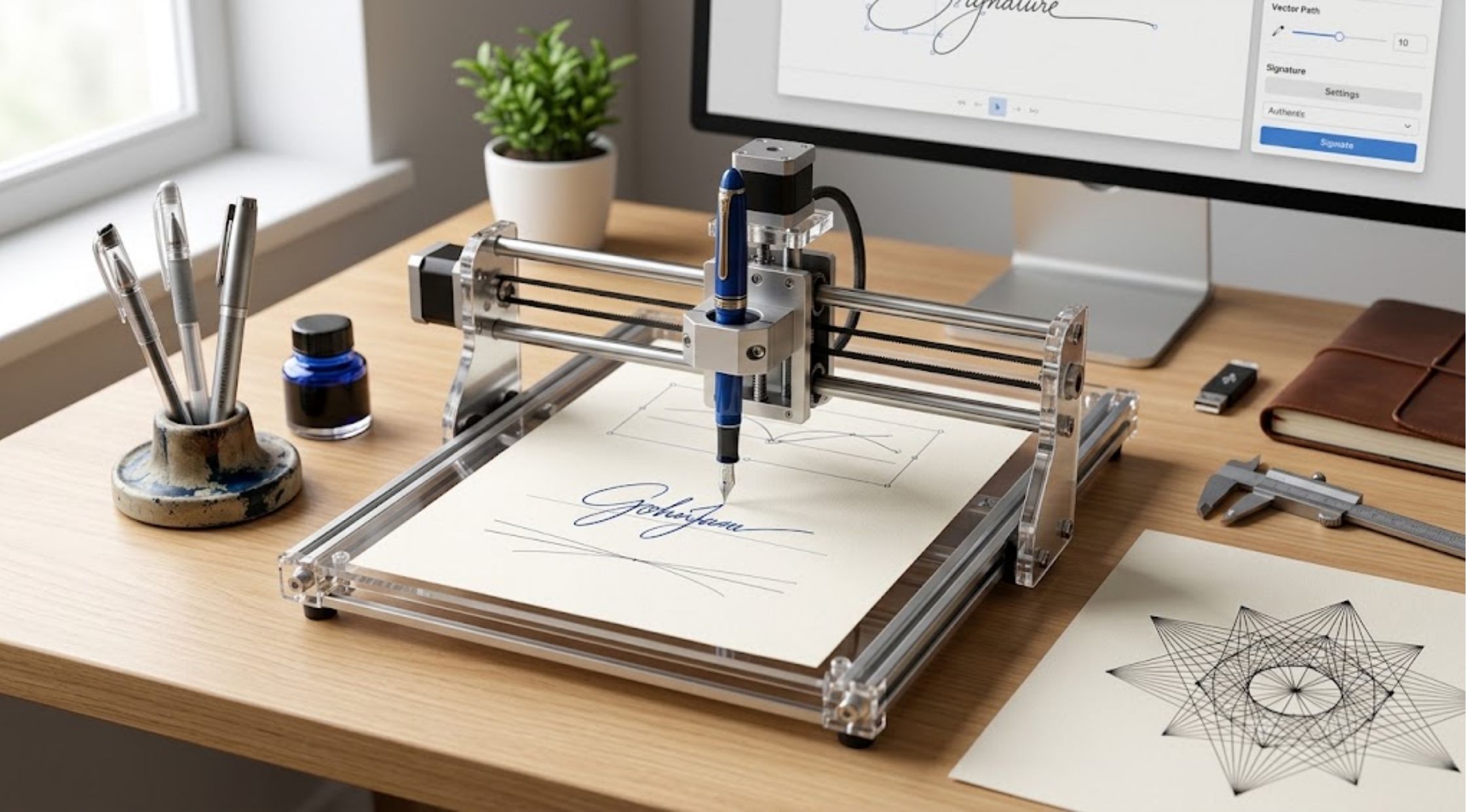
Automated writing and drawing machines bridge mechanical precision with traditional pen-and-paper aesthetics. Whether you need an autopen signature machine for high-volume document signing or a precision pen plotter for intricate artwork, understanding the technology, software integration, legal considerations, and physical setups ensures you choose the right system.
1. What Is an Autopen Signature Machine?
An autopen signature machine is a motorized, computer-controlled device that holds an authentic writing instrument (fountain pen, ballpoint, rollerball, or marker) and moves it along X, Y, and Z axes to replicate a human signature or handwritten passage directly onto paper.
Key Considerations When Selecting:
- Signature Consistency & Pressure Control: Look for systems with adjustable Z-axis (vertical) pressure sensitivity to match authentic pen strokes, variations in line weight, and natural ink flow.
- Pen Compatibility: Ensure the machine's universal pen adapter accommodates varying barrel diameters (e.g., fountain pens, gel pens, Calligraphy pens, or paint markers).
- Speed vs. Quality: High motor speeds handle large mailings quickly, but slower speeds yield higher line precision and prevent ink bleeding.
- Programmability & Vector Support: Check if the system accepts standard vector formats (.SVG, .GCODE, .DXF, or .HPGL) generated via software.
- Machine Footprint & Workspace: Match the physical writing area (e.g., A4, A3, or custom larger flatbeds) to the size of your target documents or envelopes.
Legal & Authorization Protocols
Important: Automated signatures carry legal and financial implications. Ensure you have explicit, documented authorization to use an auto-generated signature on contracts, certificates, or correspondence. Always implement strict physical and digital access controls (password protection, secure file storage, restricted access to the machine) to prevent unauthorized signing.
2. What Is a Pen Drawing Machine (Plotter)?
While an autopen focuses heavily on reproducing signatures and linear scripts, a drawing plotter is designed to guide a pen across a wider canvas to create complex geometric patterns, digital illustrations, generative art, calligraphy, and custom lettering. Brands like UUNA TEK engineer machines specifically designed for both automated writing and complex vector drawing applications.
Parameters for Selecting a Drawing Machine
- Drawing Area: Determine whether your projects require standard letter formats or wide-format plotting (such as A3 or larger wall-mounted architectures).
- Software & Vector Workflow: Verify compatibility with design tools like Inkscape, Adobe Illustrator, or specialized pen-plotting extensions (e.g., AxiDraw or UUNA TEK control interfaces).
- Motor Precision & Resolution: Look for micro-stepping stepper motors that eliminate jagged lines or irregular curves in detailed art.
- Paper Surface & Fixturing: Ensure the flatbed or writing surface includes reliable paper alignment clips, magnetic boards, or vacuum holdsto prevent paper shift during rapid pen movements.
3. Step-by-Step Setup & Operation Protocol
Following a systematic setup sequence prevents ruined documents, paper tears, and pen clogs.
- Secure the Paper: Mount the paper flat onto the drawing board using magnetic clips or drafting tape to ensure it remains stationary throughout the process.
- Install & Zero the Pen: Insert your preferred writing instrument into the pen holder. Adjust the physical height so the tip hovers slightly above the paper when raised (pen-up state).
- Calibrate Pen Pressure: Set the Z-axis drop depth and speed. Run a test stroke on scrap paper of identical stock to verify ink flow, line weight, and pressure without tearing the paper.
- Run Alignment Test: Execute a bounding box trace to confirm the signature or design falls within the designated margins or signature lines of your document.
- Execute Authorized Plot: Send the complete file to the machine and monitor the initial strokes to ensure smooth ink delivery.
4. Machine Comparison: Autopen vs. Drawing Plotter
|
Feature / Capability |
Autopen Signature Machine |
Automated Drawing Machine (Plotter) |
|
Primary Function |
Replicating signatures, short notes, & repetitive mailings |
Intricate illustrations, generative art, calligraphy, & vector designs |
|
Workspace Requirement |
Compact desktop footprint (optimized for A4/letter/envelopes) |
Medium to large flatbed work areas (A4, A3, up to A2+) |
|
Speed & Throughput |
Optimized for rapid, repeatable single-file execution |
Variable; optimized for high detail and complex vector paths |
|
Pen Variety |
Standard ballpoints, gel pens, rollerballs, fountain pens |
Fine liners, brush pens, metallic markers, technical drawing pens |
|
Best For |
Executives, university offices, non-profits, diploma processing |
Artists, designers, educators, invitation crafters, hobbyists |
5. Routine Preventive Maintenance Checklist
To maintain vector accuracy and prevent motor wear, follow a consistent maintenance schedule:
- Clean Guide Rails: Wipe down X and Y axis rails or aluminum extrusions weekly using a microfiber cloth to remove dust and debris that cause motor skips.
- Inspect Pen Holders: Ensure set screws, spring tensioners, and pen clamps are clean and free of dried ink or metallic shavings.
- Check Belts & Bearings: Inspect timing belts regularly for tension and check bearings for smooth linear travel.
- Firmware & Driver Updates: Keep machine firmware and plotting software extensions updated to maintain OS compatibility and motor optimization.
- Dry Storage: When not in use, cover the unit to prevent dust build-up on linear bearings and store delicate pens capped and upright.
Final Thoughts
Choosing between an autopen signature system and a drawing plotter comes down to your primary workflow. If your objective is reproducing consistent, authorized signatures or personalizing large volumes of correspondence, a dedicated autopen system offers speed and ease of operation. If your focus is artistic creation, generative design, or varied calligraphy using diverse pens and paper stocks, a flexible drawing machine (such as those offered by UUNA TEK) provides the necessary precision and vector control.
Recent Blogs
-
How to Choose an Autopen Signature Machine & Drawing Machine
-
How to Choose an xTool UV Printer, F2 Ultra & Apparel Printer
-

Why More Coffee Lovers Are Choosing Glass Coffee Makers and Plastic-Free Brewing
-
How to Handle Home Projects Like a Pro (Without Overcomplicating It)
-
Step-by-Step Guide To Use Spin Scrubbers By HOTO